
My Role
Product Designer
Timeline
1 month during internship
Key Deliverables
UI/UX Redesign, Interactive Prototype
Skills
Workflow Optimization, Product Design, Prototyping, UX Research
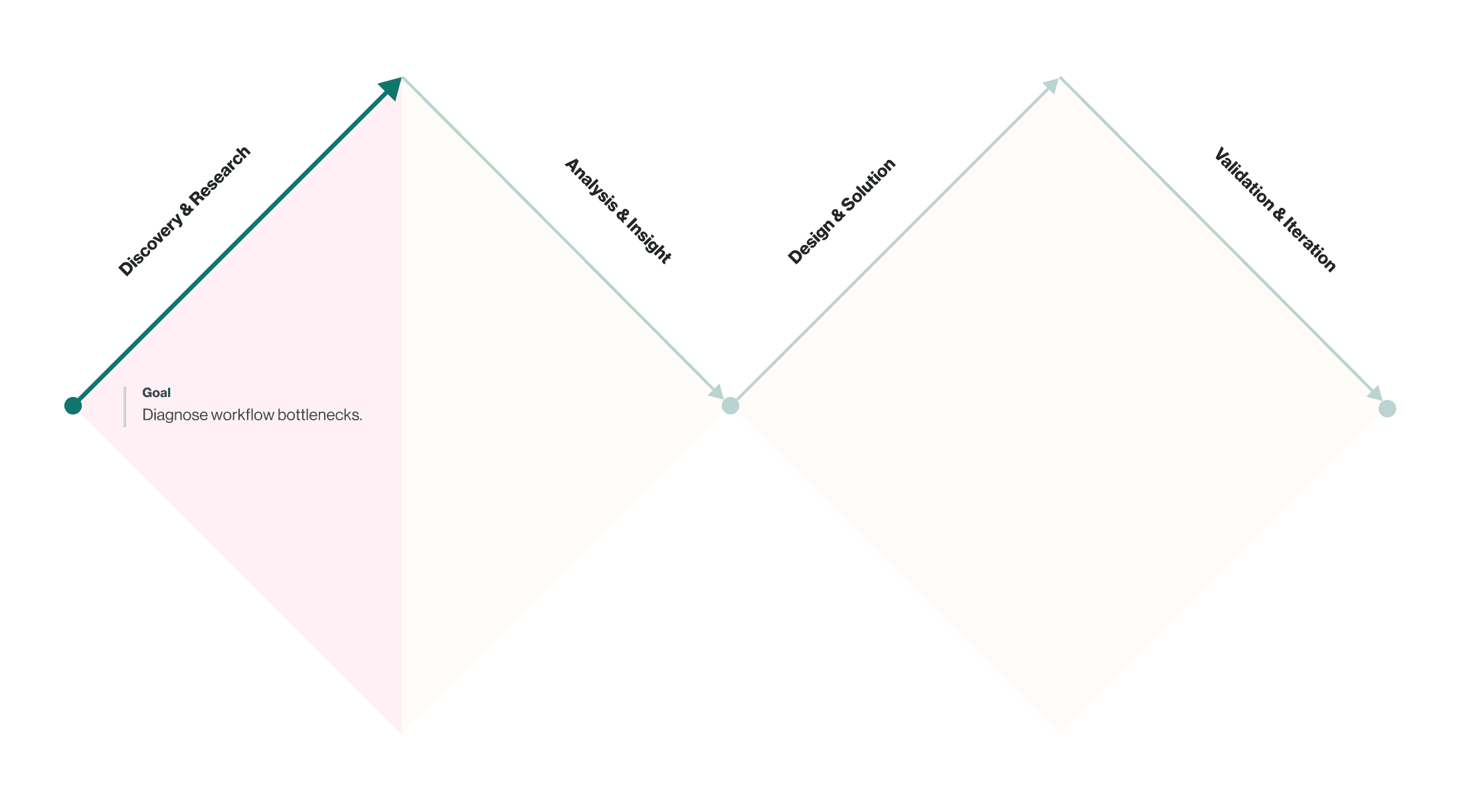
A new CMS that was slowing down content migration.
My mission was to diagnose the specific bottlenecks in the workflow and redesign the user experience to be faster, more efficient, and user-friendly.
The Web Production Team relied on a new internal CMS to manage and publish all educational curriculum. While the tool was essential to their daily operations, the workflow was slow and unintuitive. Team members were spending an excessive amount of time on routine tasks, leading to significant productivity loss and growing frustration.
To deeply understand the problem, I joined the Production team's migration project, working alongside them to migrate 100+ courses using the internal CMS tool.
Understanding user pain points and workflow inefficiencies
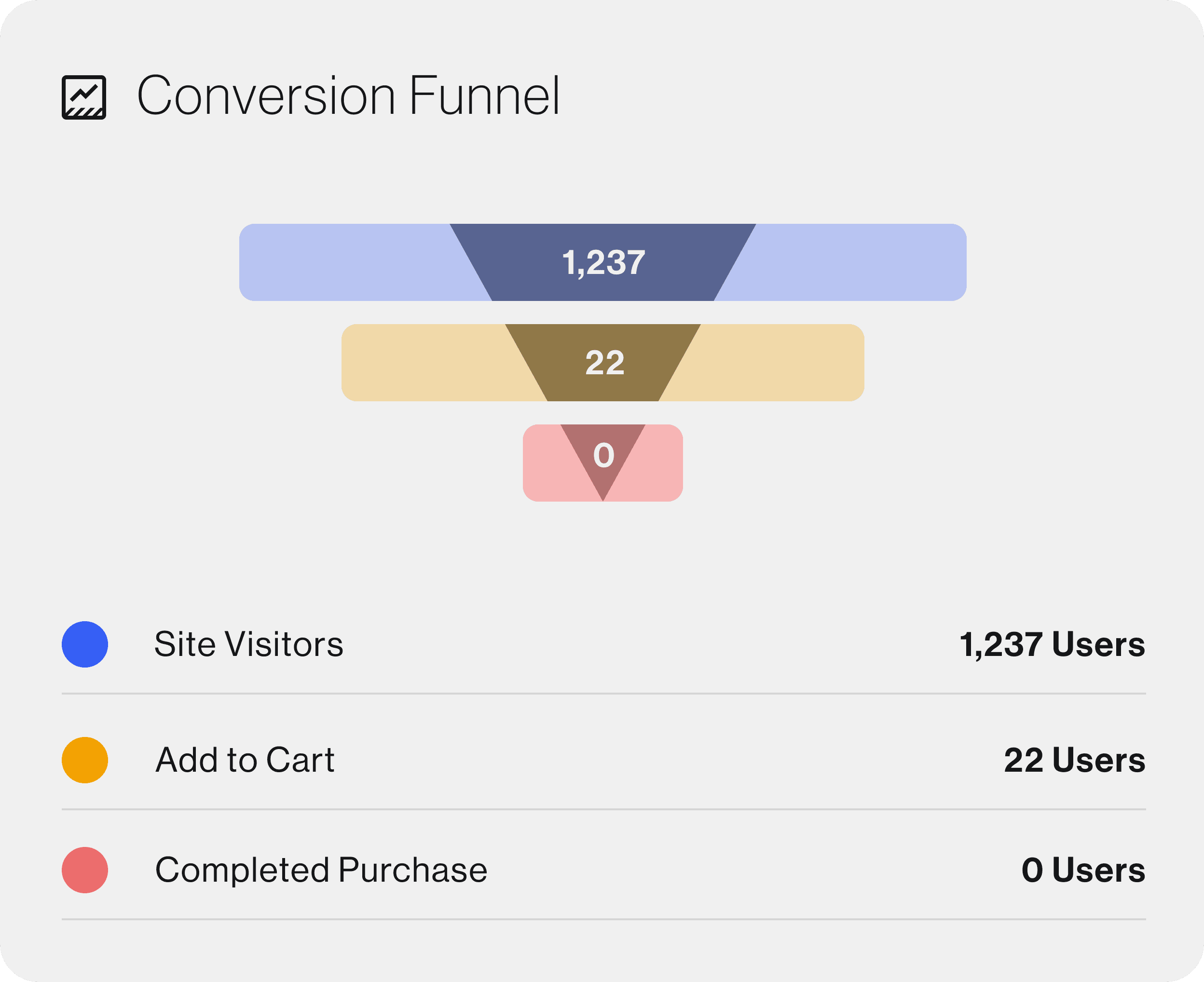
I conducted extensive user interviews with the TVO Digital Learning Team to understand their daily workflows, pain points, and frustrations with the existing system. This research revealed that the biggest issues were related to navigation complexity, redundant steps, and lack of intuitive design patterns.
Understanding user pain points and workflow inefficiencies.
I conducted user interviews with TVO Learning Production Team to understand their daily workflows, pain points, and frustrations with the existing system. By observing their processes live, gaining my own hands-on experience, and documenting their feedback, I was able to gather the raw qualitative data needed to identify specific opportunities for improvement.
These highlights helped shape the direction of my research and guided how I defined the problem space.


Synthesizing feedback into design priorities.
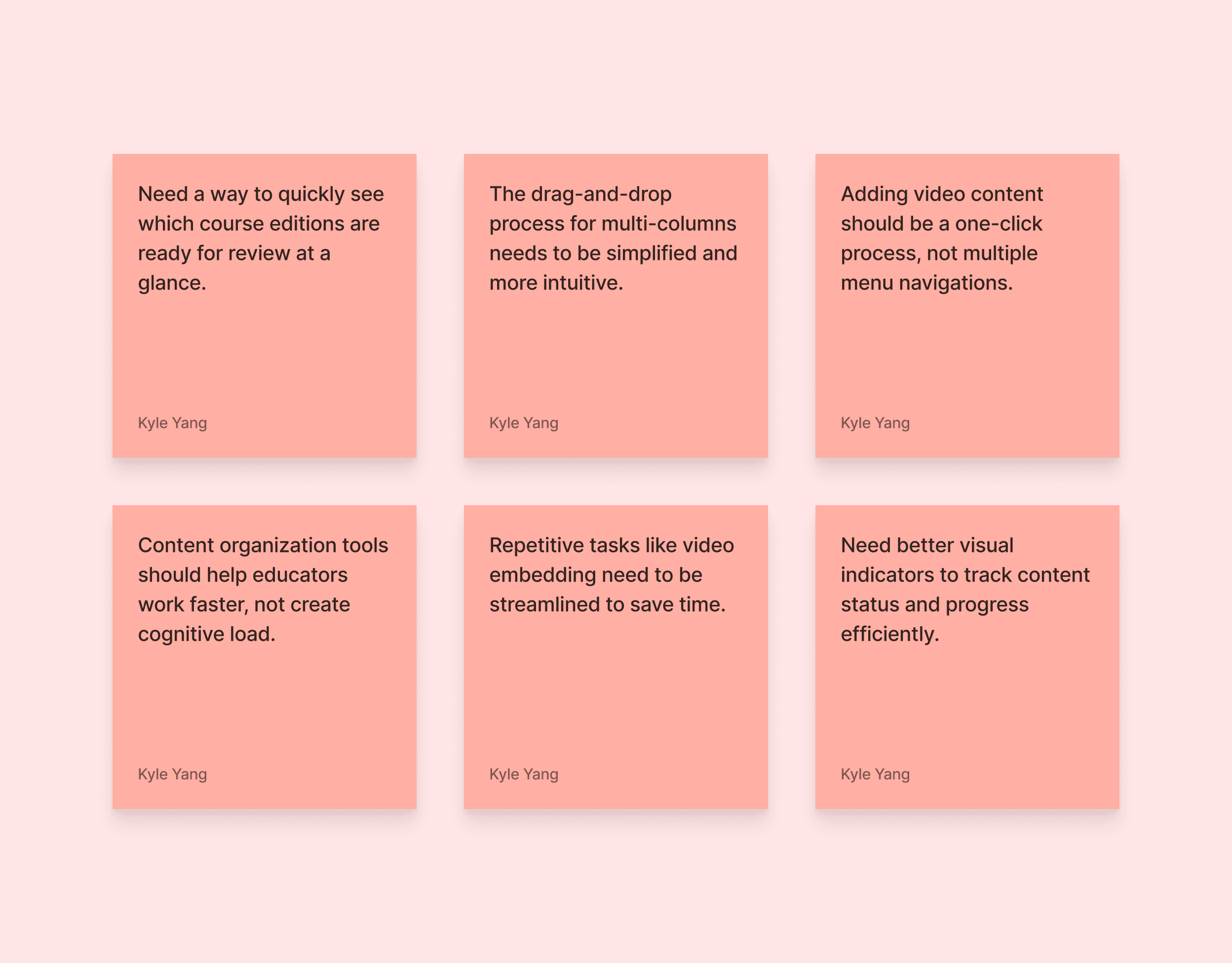
After the interviews, I analyzed the feedback to move from individual pain points to spotlight core issues. This synthesis process revealed three high-priority areas that needed immediate improvement.
Content Visibility
Users want a quick overview of which course editions are ready for review.
They need better visual indicators to track content status and progress.
Content Creation & Editing
Drag-and-drop for multi-columns should be simplified and more intuitive.
Adding video content should be a one-click process instead of multiple menu steps.
Workflow Efficiency:
Content organization tools should reduce cognitive load and help educators work faster.
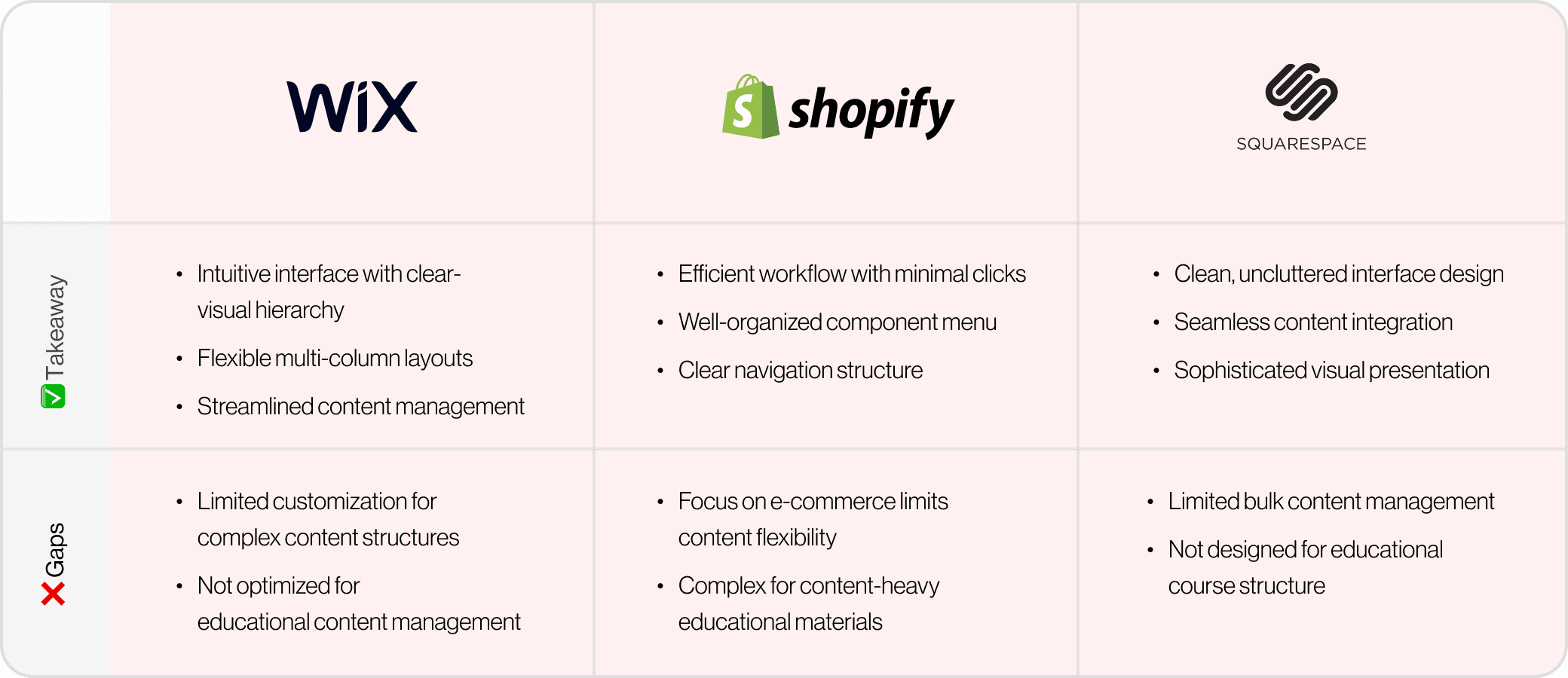
Peeking into other website builders.
After a month of working with TVO's internal tool, I recognized similarities with website building platforms. This led me to examine how established website builders approach content management, seeking inspiration for our tool's
improvement.
Key Areas for Improvement
From the hands-on experience to the user interviews, these three recurring problem areas emerged.
Course Listing Page
Multi-Column Tool
Video Integration Tool
These three areas were strategic focus points I chose to improve within the project’s limited timeframe. They surfaced repeatedly during user interviews and workflow observations, making them the most impactful opportunities for redesign.
They revealed a single pattern: the current CMS made simple actions unnecessarily complex.
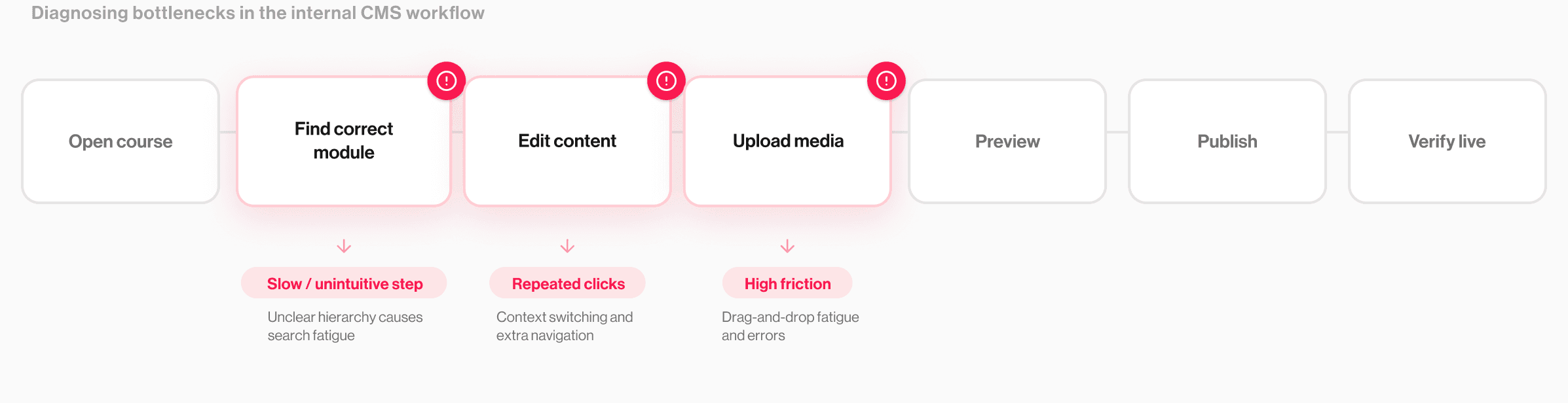
Building brand trust through design.
After defining the problem areas, I conducted a comprehensive heuristic evaluation of TVO’s internal tool. I identified specific pain points that aligned with user feedback and prioritized key areas for improvement.
The Course Listing Page is the main workspace for educators and curriculum specialists to find and manage course editions, so clarity and speed are crucial.
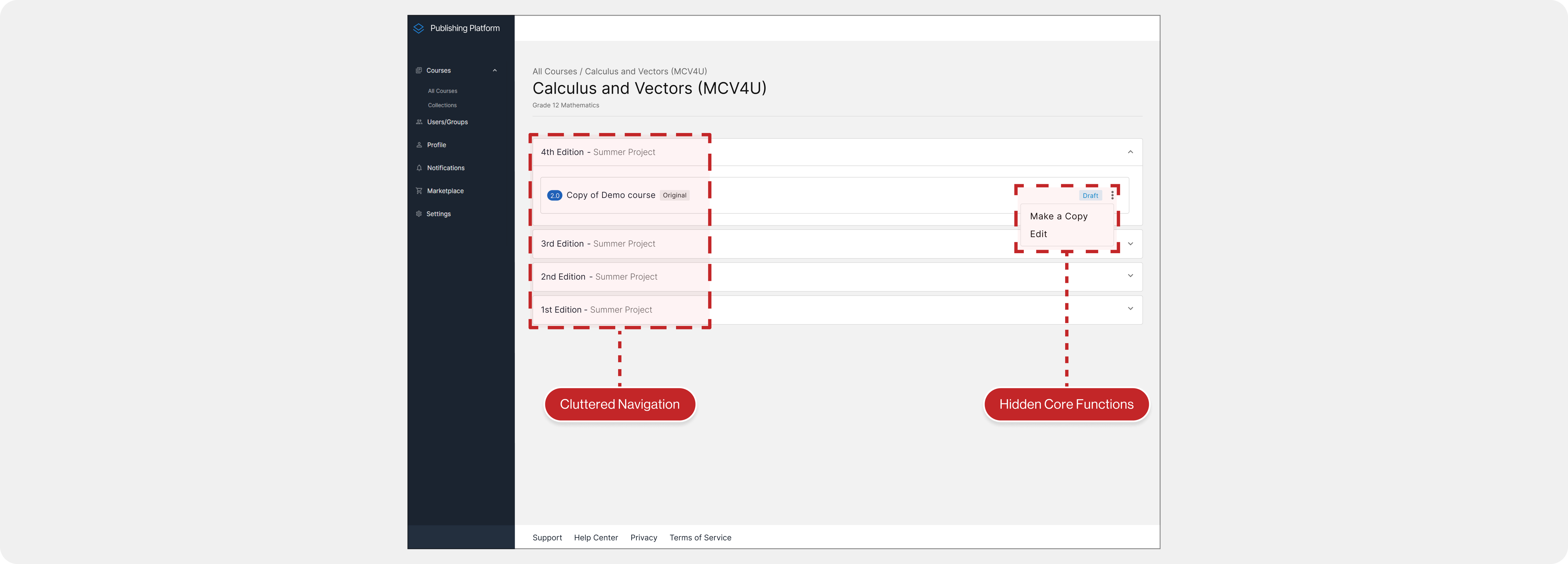
Our user feedback and heuristic review showed two main issues:
1. Editions (current and archived) were presented without a clear hierarchy, making it hard to tell what was active and slowing people down
2. High-frequency actions like “Make a copy” and “Edit” were buried in a kebab menu, adding extra clicks to tasks users perform often.

Key Improvements:
1. Clear Edition Hierarchy
Implemented distinct headers for "Recent" and "Previous" editions.
Created visual separation between active and archived content.
2. Organized Tags
Positioned related status tags side-by-side for easier navigation.
3. Streamlined Actions
Removed the unnecessary kebab menu.
Brought primary actions ("Make a Copy" and "Edit") directly to the interface.
Result:
Clear grouping of Recent vs Previous editions made active content immediately scannable, while aligned status tags improved wayfinding. Bringing Make a Copy and Edit into the main UI removed extra clicks, speeding up high-frequency course management tasks.
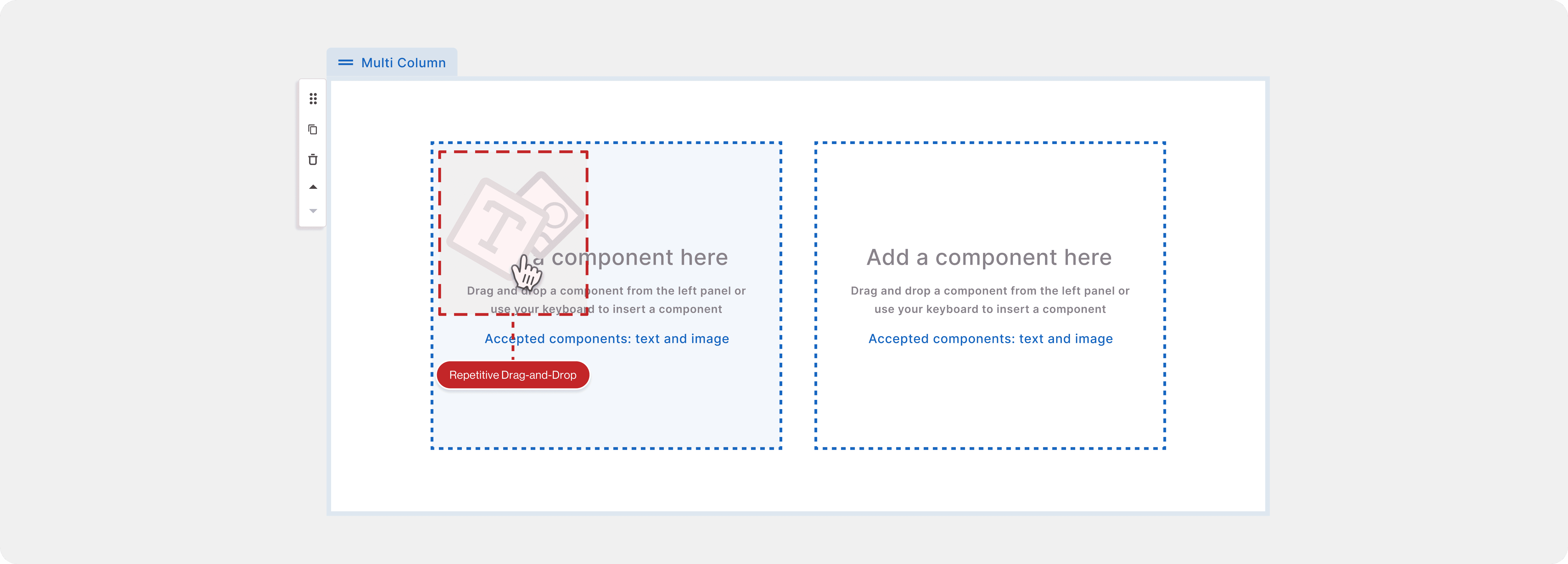
The Multi-Column tool lets educators place text and images side by side, which is essential for instructional clarity. But in day-to-day authoring, the interaction was wearing users down. Our user feedback and usability review surfaced two main issues:
Even though the tool only allowed Text and Image, users still had to drag each element from the side panel into the column, creating unnecessary steps.
This repetitive drag-and-drop caused constant context switching and long mouse travel, leading to click fatigue and, for some users, physical strain over time.
Key Improvements:
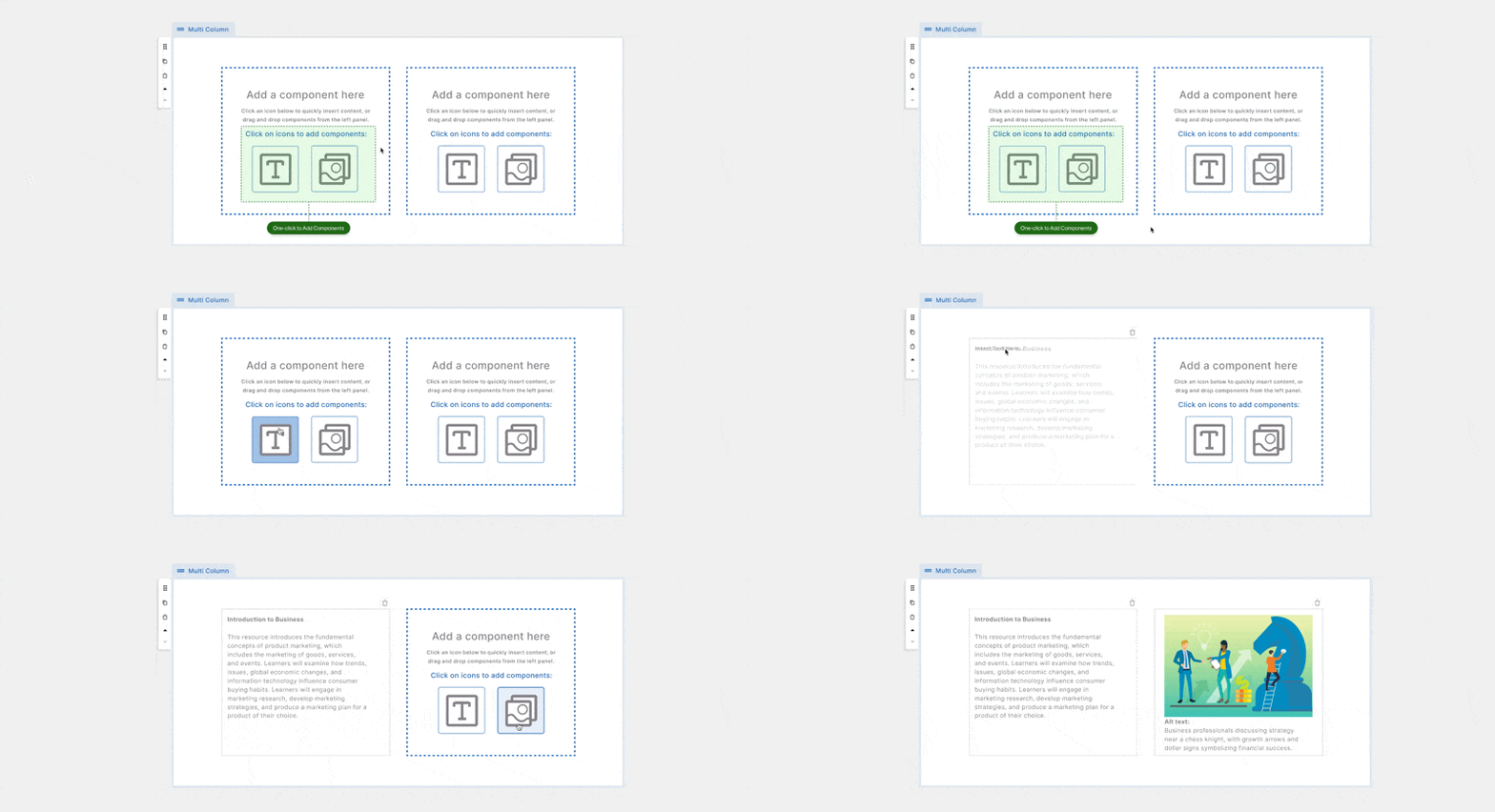
1. One-Click Content Insertion
Embedded “Text” and “Image” buttons directly inside each column so authors can insert content immediately without leaving the layout.
2. Reduced Interaction Fatigue (while keeping control)
Removed the need for repeated panel trips and drag actions, cutting mouse travel and clicks while preserving the same column layout flexibility.
Result:
Adding in-column Text/Image buttons removed repetitive drag-and-drop and side-panel switching, cutting clicks and mouse travel during multi-column builds. The flow felt faster and less fatiguing over long authoring sessions, while keeping the same layout control.
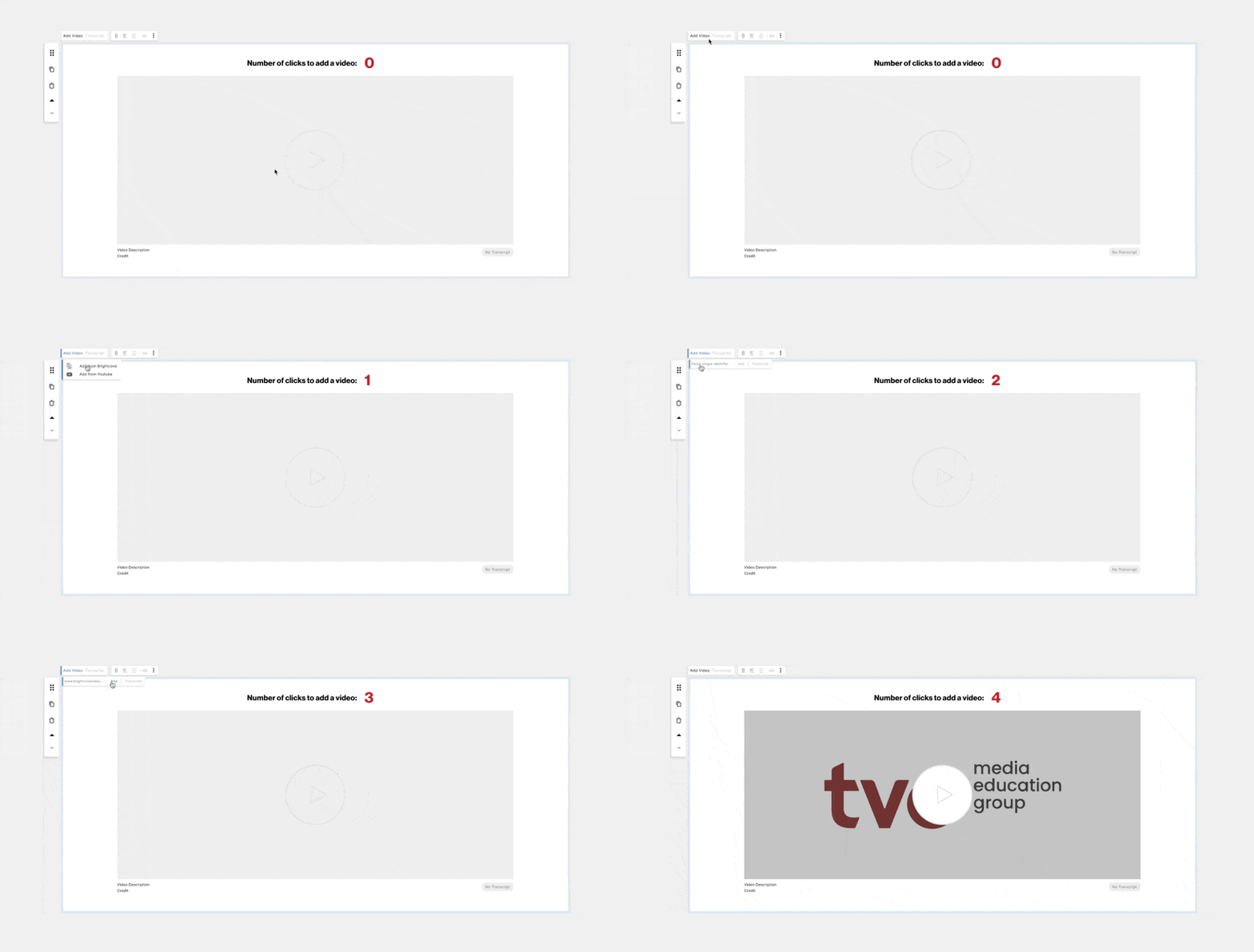
Video is a core content type for course authors, so embedding needs to be fast and predictable. But the original flow added friction to a task educators repeat constantly. User interviews and my own authoring experience surfaced two main issues:
1. Embedding a video required a four-step process, including choosing between YouTube and Brightcove every time, which slowed down a high-frequency workflow.
2. Platform selection was redundant. Brightcove was clearly the primary platform in real use, yet the UI treated both options as equal on every embed.
Key Improvements:
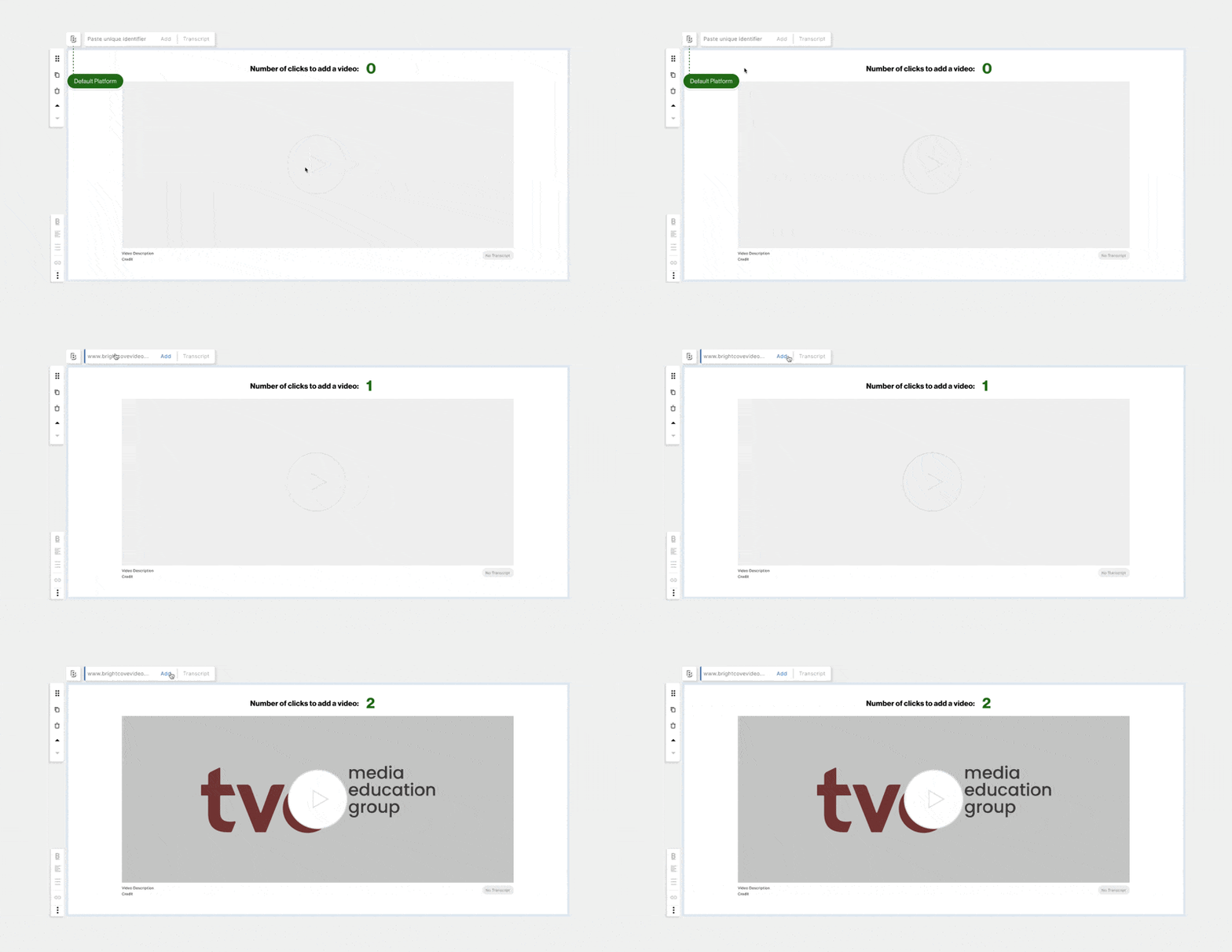
1. Brightcove as Default
Set Brightcove as the pre-selected option to match actual authoring behavior and remove an unnecessary decision point.
2. Streamlined Controls
Surfaced only the most-used embedding actions upfront, reducing navigation and cognitive load.
Result:
This reduced required clicks by 50% (4 → 2), cutting embedding time in half and aligning the tool with how educators actually build courses.
Validated with the Product Design team.
I presented the redesigns to TVO’s Product Design team, then shared a clickable prototype and short survey to confirm usability gains and sprint readiness. The feedback strongly supported clearer course management and faster authoring workflows.

A roadmap for continued growth.
This project reinforced how much strong design depends on what you notice and capture in real workflows. By working inside the team’s migration, I saw how small moments of friction compound into major productivity loss—and how careful documentation turns that into clear, solvable problems.
Even the smallest feedback: from educators, curriculum specialists, or teammates, ended up shaping the direction of the work. Consistent note-taking helped me connect scattered observations into a clear problem definition, and it reminded me that good UX often starts with disciplined, intentional documentation.
Because of time constraints, I didn’t get to see the redesigns go live, even though the Course Listing Page was prioritized into the next sprint. With more time, my next step would be to run A/B testing on the updated Course Listing experience and measure improvements in task speed, clarity, and error rates, using real authoring data to confirm impact and guide further iteration.